Random Post

Thursday, 22 December 2011

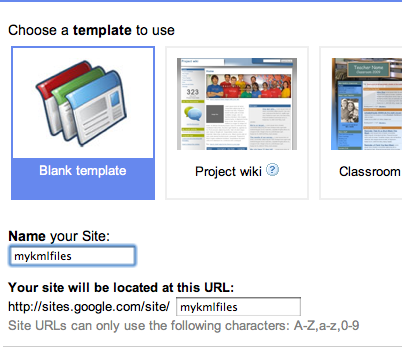
How to create a free wesites and a free blog?

Google sites is powerful enough for a company internet, yet simple enough for a family website. Get more from google sites with google application premier edition.
They give following futures:
  • 10 GB of google sites storage plus 500MB for each premier edition user account.
  • Manage google sites sharing settings across your Business.
  • Easily publish google sites with in your company.
  • single click page creation 
  • No HTML required.
  • Customizable look and feel.
  • Settings for accessory and sharing informations.
  • And its free. 
  • Get started click here.

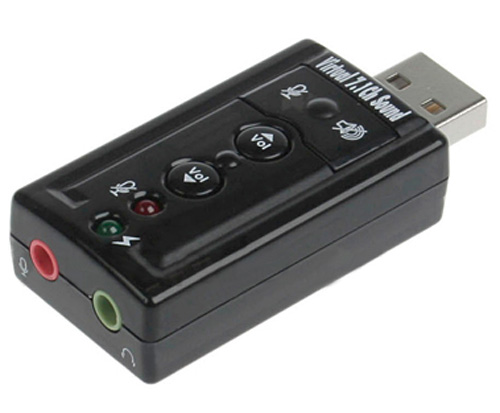
Installing a USB Sound Card in Your Laptop

The newest laptops ship with no PCMCIA slot, only the Express Card slot. Normally, there are no sound cards that fit the Express Card slot so you’ll need to use a USB sound card or system.
Follow these steps to install a USB Sound Card......
  • Plug the USB sound card into the appropriate USB plug on your laptop.
  • Wait for the computer to recognize the new USB device.
  • Insert the sound card manufacturer’s CD if prompted to do so.
And you're off and running. Use the USB Sound card without the worry of having to open any computer.

Friday, 16 December 2011

Burn a Data CD or Data DVD in Windows 7 Using Media Player

You can burn a data CD or data DVD in Windows 7 using Media Player. An audio CD can contain just approximately eight minutes of music. On the other hand, if you burn a data CD or data DVD in Windows 7 using Media Player, it will be able to hold numerous hours of music. Video files and pictures can also be added to the data discs.
Advantages
 When you burn a data CD or data DVD in Windows 7, the Windows Media Player does not transform the selected files to a different format prior to saving them to a blank data disc, so the files stay in the compressed condition. This allows you to put much more items on a single disc.
 As the format of the files is not changed, the quality of the files remains the same. 
You can burn a data CD or data DVD in Windows 7 using Media Player as follows:
  •  Click Start.
  •  Click All Programs.
  •  Select Windows Media Player.
  •  Click the Burn tab in the Player Library.
  • Click Burn options and select Data DVD or CD.
  •  Insert a blank disc into the CD or DVD burner of your computer.
  • Close the Auto Play dialog box if it comes into sight.
  •  Some people have more than one CD drive in their computer. If you have multiple CD drives in your computer too, select the one you would like to use in the navigation window.
  •  Look for the songs you want to burn.
  •  In order to make your burn list, drag the songs from the details pane in the center of the Player Library to the list pane which is on its right side.
  •  You can also change the order of the items in the burn list by dragging them upward or downward in the list. 
  •  To remove a song from your list, simply right-click on the item and click on Remove from list.
  •  After you finish making your list, click upon Start burn.
It can take a while to burn a data disc. If your selected items cannot fit in one disc, you also have the choice of burning the rest of the items to a different disc. A data DVD is not the same as a DVD-Video disc e.g. the movie DVD you buy or rent from the store.

Computer security

Computer security is a branch of computer technology known as information security as applied to computers and networks. The objective of computer security includes protection of information and property from theft, corruption, or natural disaster, while allowing the information and property to remain accessible and productive to its intended users. The term computer system security means the collective processes and mechanisms by which sensitive and valuable information and services are protected from publication, tampering or collapse by unauthorized activities or untrustworthy individuals and unplanned events respectively. The strategies and methodologies of computer security often differ from most other computer technologies because of its somewhat elusive objective of preventing unwanted computer behavior instead of enabling wanted computer behavior.

What is computer?

A computer is a programmable machine designed to sequentially and automatically carry out a sequence of arithmetic or logical operations. The particular sequence of operations can be changed readily, allowing the computer to solve more than one kind of problem. An important class of computer operations on some computing platforms is the accepting of input from human operators and the output of results formatted for human consumption. The interface between the computer and the human operator is known as the user interface.
Conventionally a computer consists of some form of memory for data storage, at least one element that carries out arithmetic and logic operations, and a sequencing and control element that can change the order of operations based on the information that is stored. Peripheral devices allow information to be entered from an external source, and allow the results of operations to be sent out.
A computer's processing unit executes series of instructions that make it read, manipulate and then store data. Conditional instructions change the sequence of instructions as a function of the current state of the machine or its environment.
The first electronic digital computers were developed in the mid-20th century (1940–1945). Originally, they were the size of a large room, consuming as much power as several hundred modern personal computers (PCs). In this era mechanical analog computers were used for military applications.
Modern computers based on integrated circuits are millions to billions of times more capable than the early machines, and occupy a fraction of the space. Simple computers are small enough to fit into mobile devices, and mobile computers can be powered by small batteries. Personal computers in their various forms are icons of the Information Age and are what most people think of as "computers". However, the embedded computers found in many devices from mp3 players to fighter aircraft and from toys to industrial robots are the most numerous.